
Blog English
Facebook Messenger Broadcast: The Complete Guide for Businesses

Aug
Facebook Messenger broadcast lets a business send one message to many contacts on Messenger at the same time, instead of typing to each person individually. For business owners and marketers running a Facebook Page, this single feature can turn a quiet product update into hundreds of conversations within minutes. When used effectively, Messenger broadcasts help businesses reconnect with previous customers, increase engagement, and save hours of manual messaging. Used carelessly, it can trigger spam reports, missed reply windows, or even a restricted Page. This guide covers how Messenger broadcast works, why timing matters, how Pages get restricted, and how message templates keep outreach compliant.
Facebook Messenger broadcast is the practice of sending one message to many Messenger contacts from a Facebook Page at once, typically used for updates, promotions, and customer care.
CONTENT
What Is Facebook Messenger Broadcast?
A broadcast is different from a normal Messenger chat. Instead of one agent replying to one customer, a Page owner prepares a single message, text, image, or a short video, and sends it to a list of contacts who have messaged the Page before. For a business, that might mean announcing a new arrival to hundreds of people who asked about stock last month. For a customer service team, it might mean confirming a policy update to everyone waiting on the same question. The biggest benefit is the time it saves: what would take hours of manual typing happens in minutes. The trade-off is that Facebook applies stricter rules to bulk sending than to individual replies, which is exactly why the next three sections matter.
Why the 24-Hour Window Matters for Facebook Messenger Broadcast
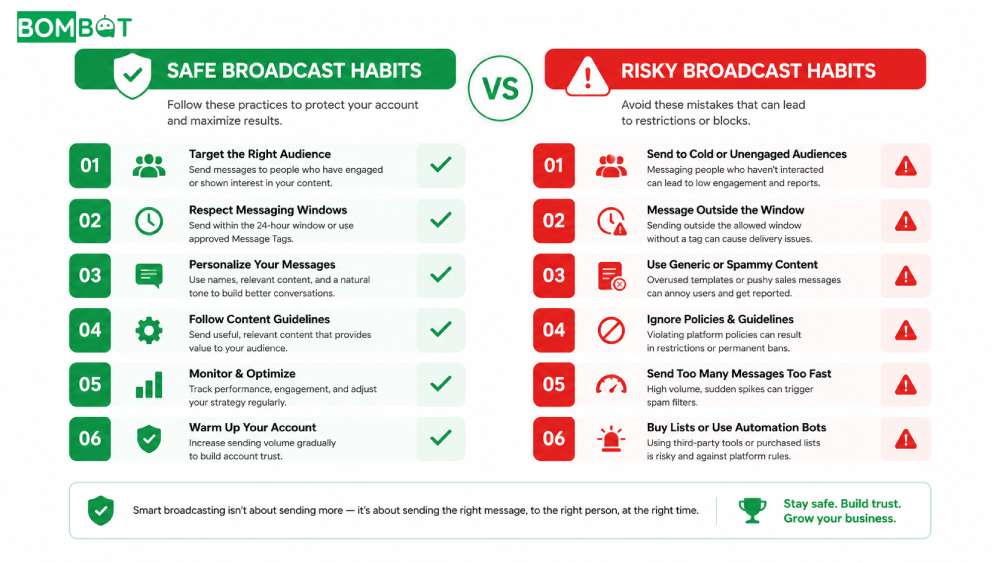
Facebook only generally allows free-form messaging access for a limited period after a customer last messaged the Page, commonly known as the 24-hour window. Once that window closes, standard messages may no longer deliver the way they did during an active conversation. For broadcast senders, this changes everything about timing: a message prepared for “all recent contacts” is not the same as a message that actually reaches all of them, because some contacts fall outside the window by the time the message goes out. Planning broadcast content around this window, rather than around a fixed calendar date, protects both delivery rates and the Page’s standing with Facebook.
Facebook 24-Hour Messaging Window Explained Read more
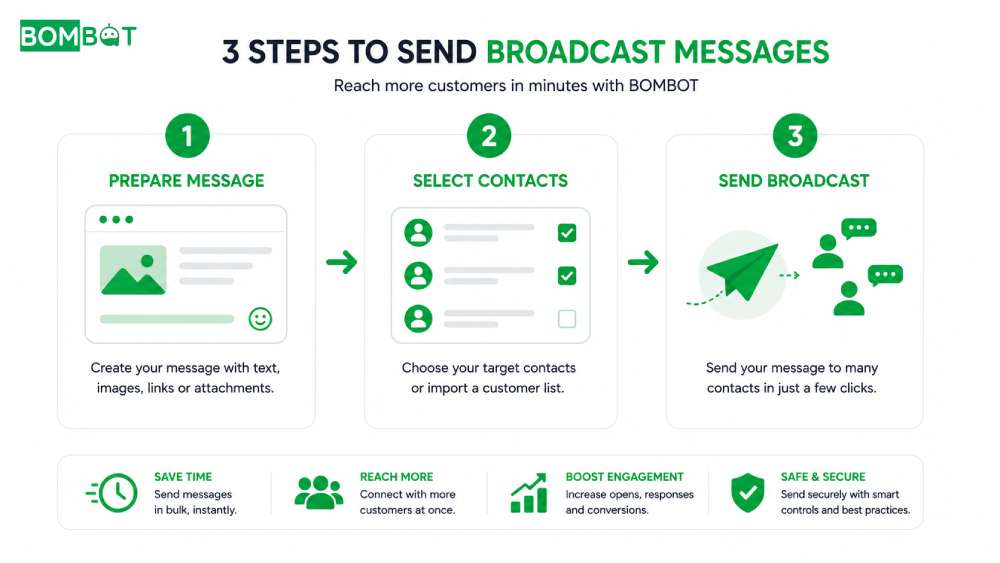
Why Facebook Pages Get Restricted From Broadcast Messaging
A Facebook Page can lose part or all of its messaging ability if enough people report a conversation as spam, or if a Page repeatedly sends unsolicited bulk messages to contacts who never asked for them. Restrictions can range from a temporary limit on new conversations to a full block on sending messages. For a business that relies on Messenger to announce promotions or follow up with old customers, this is one of the costliest risks in broadcast messaging, because it removes the channel entirely, sometimes with little warning.
Why Facebook Pages Get Restricted From Messaging Read more
Using Message Templates for Business Broadcast
Facebook recognizes a set of structured message formats built for specific business purposes, from post-purchase updates to event reminders. These templates carry clearer intent than a plain text blast, which tends to make them easier for recipients to recognize as expected communication rather than unsolicited marketing. For a Page sending broadcasts regularly, building a small library of templates for common scenarios, restock alerts, order confirmations, appointment reminders, keeps messaging both faster to produce and more consistent in tone.
Facebook Message Templates for Business Broadcast Read more
Common Mistakes Businesses Make With Facebook Messenger Broadcast
- Sending the same broadcast to a Page’s entire contact list regardless of how the person originally reached out.
- Ignoring the 24-hour window and assuming every message will deliver instantly.
- Treating every reported message as harmless, which quietly raises restriction risk over time.
- Writing generic, sales-only copy with no clear reason for the recipient to care.
- Sending broadcasts too frequently, which increases spam reports even when the content itself is reasonable.
Frequently Asked Questions About Facebook Messenger Broadcast
How often can a business send Facebook Messenger broadcast messages?
There is no fixed daily limit, but sending too frequently raises the chance of spam reports and message restrictions. Most Pages stay safest broadcasting a few times a week at most, reserving daily messages for time-sensitive updates like order status.
Does Facebook restrict how many messages I can broadcast per day?
Facebook does not publish an exact daily cap, but it does track spam reports and unusual sending patterns. A sudden spike in bulk messages after months of normal activity is more likely to trigger a review than a steady, moderate sending pace.
Is Messenger broadcast the same as an automated chatbot?
No. Broadcast sending means a person prepares a message and chooses when to send it to a contact list. It is not an automated reply system, and it does not read or classify incoming messages on its own. Tools like BOMBOT are built around this same principle: you create the send, the tool delivers it.
Getting Started With Safer Messenger Broadcast
Keeping a Facebook Page safe while sending Messenger broadcasts comes down to timing, relevance, and consistency. BOMBOT helps by sending bulk messages to your existing Fanpage contacts safely, without the manual work of typing to each person one by one. Try it free at bombot.vn.
How To Send Bulk Messages With Bombot Watch full
